Dummy Beam
Specifically for plates, it is possible to enter dummy beams. Arithmetically, a dummy beam is taken into account with small bending stiffness.
Line Loads: With dummy beams, any line loads on a plate can be taken into account.
Line supports: Dummy beams can be supported by.
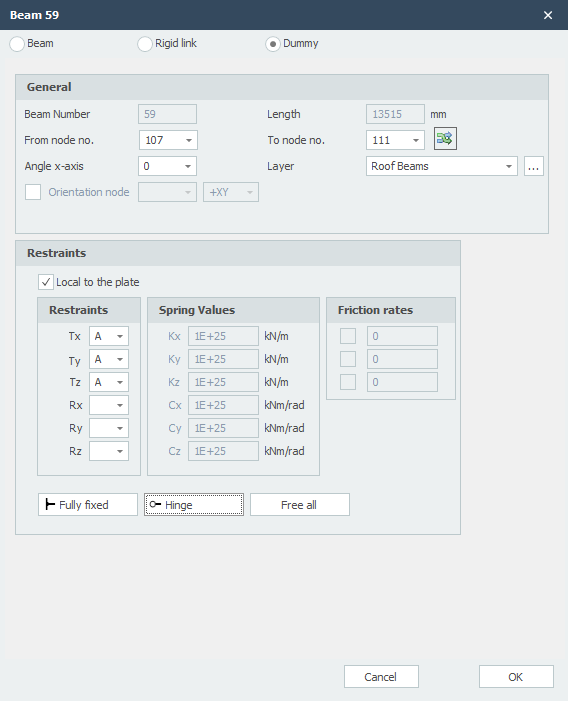
Beam Number
The number of the beam.
Length
The length of the beam in mm.
From Node No.
The number of the begin node.
To Node No.
The number of the end node.
Flip Beam Orientation

By the use of this function, you can turn around the beam orientation. The begin- and end node will be switched.
Angle x-axis
The angle in which the local coordinate system can rotate around the x-axis.
The clockwise direction is positive.
Layer
Beams can optionally be drawn in layers. This corresponds to the functionality of AutoCAD. The layers can be set visible or invisible (on/off). You can adapt the names of the layers. See Display options
Orientation Node
The number of the orientation node. This is a node in the local x-y plane or in the x-z plane.
Line Supports
| Indication | Description |
|---|---|
| ' ' | free - no limitation |
| 'A' | Fully limited (Absolute) |
| 'P' | Limited for a Positive reaction force; free for a negative reaction force |
| 'N' | Limited for a Negative reaction force; free for a positive reaction force |
| 'S' | Springer (Spring); spring value needs to be inserted |
Local to the Plate
Setting whether the supports are to be introduced in relation to the local axle system of the plate.
Supports / Restraints
Here you enter how the beam is supported. There are many possibilities.
You can use the most common / standard supports:
Fully fixed: Tx=A(Absolute), Ty=A, Tz=A, Rx=A, Ry=A, Rz=A. (That is the default setting)
Hinged: Tx=A, Ty=A, Tz=A. No moments can be transmitted, only transverse and normal forces.
Spring Support
You can also enter a spring support. Tx=S(Spring), Ry=S and/or Rz=S. You also give the spring value Kx, Cy and/or Cz in kN/m or kNm/rad.
Local x-axis
Input Per Beam
This gives you the possibility to adapt the input for every new beam.