Supports
Standard supports can very easily be added in the graphical screen. In the menu bar you can choose one of the following supports:
Standard Support Types
 Pinned support (Tz,Ty,Rz) ('A','A',' ')
 Roller support z-direction (Tx,Tz,Ry) (' ','A',' ')
 Roller support x-direction (Tx,Tz,Ry) ('A',' ',' ')
 Fixed support (Tx,Tz,Ry) ('A','A','A')
 Spring support x-direction (Tx,Tz,Ry) ('S',' ',' ')
 Spring support z-direction (Tx,Tz,Ry) (' ','S',' ')
 Spring support y-direction (Tx,Tz,Ry) (' ',' ','S')
Remark:
These are the supports that are most common in practice, but you can also add an arbitrary (spring) support by making use of 'A', 'P', 'N' or 'S'. See the table below.
Supports can be added arbitrarily, in a fixed raster or on grid lines.
Supports are nodes which are restrained in a certain direction.
Changing a Support
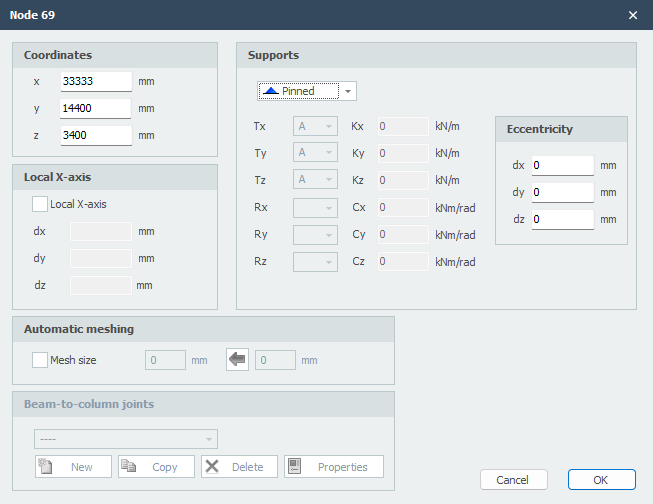
Changing a support is possible by clicking on the node with the left mouse button, and subsequently choose properties by clicking the right mouse button. There is also an easier way, namely by a double click on the node or support. Consequently the following dialog box will be opened.
Support Indication Codes
| Indication | Description |
|---|---|
| ' ' | Free - no limitation |
| 'A' | Fully limited (Absolute) |
| 'P' | Limited for a Positive reaction force; free for a negative reaction force |
| 'N' | Limited for a Negative reaction force; free for a positive reaction force |
| 'S' | Spring (Spring); spring value needs to be inserted |
Table Nodes
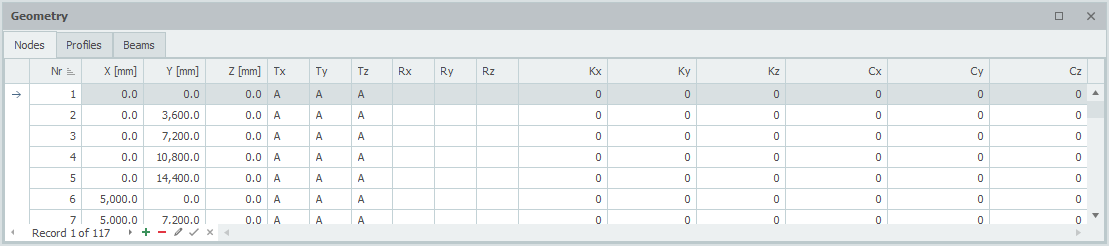
Supports can also be added/changed in the table nodes in the left bottom. It does not matter. It is also possible to change between graphical input and numerical input via tables.