Optimize steel profiles
With the function optimization you can very easy and quick create an optimal design of your steel construction. This function can spare you a lot of steel kilos.
How does that work?
You will go through all the profiles (in the table Profiles ) as you have inserted before. See Beams
The alternatives per profile will be shown directly. From these alternatives you can select another profile.
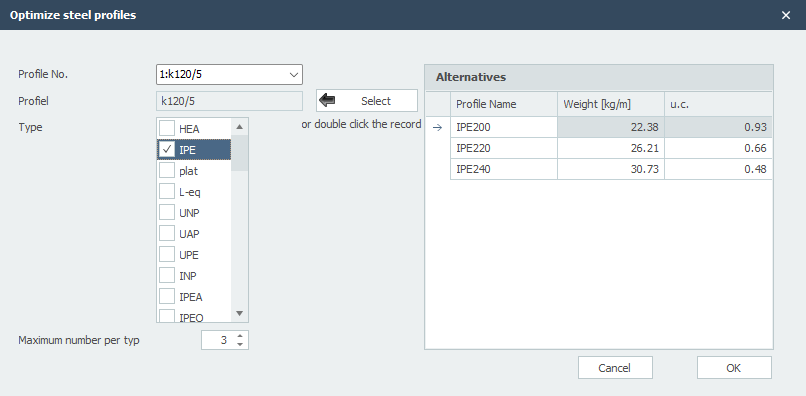
Profile No.
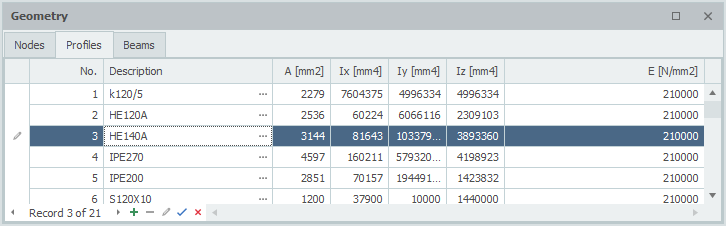
The profile number refers to the profile number in the table Profile shown below
Profiles
Profile
The chosen profile
Type
Here you select the profile type (or group) in which there can be searched for alternative profiles.
Maximum number per type
Here you can enter the maximum amount of alternatives per profile type. Standard this value is at 3, but you can vary this value.
Select
Hereby you choose a profile from the right table ''Alternatives''. You can also double click on the line in the table to choose the profile
Alternatives
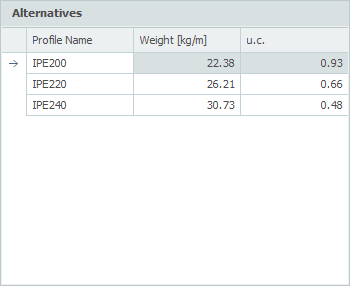
In this table the possible alternatives are directly shown. By default the table is sorted by the unity check (u.c.). This unity check is the normative check according to the Eurocode EN1993. It is also possible to sort the table by profile name or weight by clicking on the column text.
Remark: By changing the moment of inertia, the force distribution also changes. The optimization function does not take this in to account. It could be possible that the new selected profiles will not be sufficient for your design and you have to use the optimization again. However, you will experience that the optimal design will be determined quick and easy.