Sequence Load Combinations
With the right mouse button the following context menu is opened. With these functions you can easily adapt the sequence of the load combinations, or insert new load combinations.
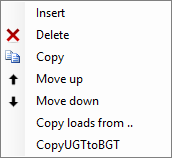
Insert
A new load combination is created and inserted above the current load case.
Delete
The load combination is deleted.
Copy
The load combination is copied.
Move Up / Move Down
A load combination can be moved up and down a line.
Copy ULS Combination to SLS
Every load combination of the type ULS will be copied as type SLS. The load factors are set to 1.00.