Rotate
Function
This function is used to revolve selected elements around a specified axis or a central pivot point at a defined angular increment.
Operation
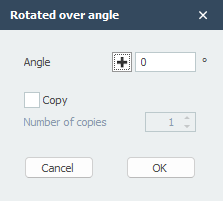
The user first defines the axis of rotation by selecting two distinct points in the workspace. Once the axis is established, the Rotated over angle dialog box appears. Within this interface, the user inputs the desired "Angle" of rotation. To create new elements rather than moving the existing ones, the "Copy" checkbox must be enabled, which then allows the user to specify the "Number of copies" to be generated around the axis before clicking "OK."