Selecting Overlapping Objects
Depending on the view, multiple objects may be behind each other. On selection, the nearest object is selected by default.
Ok. But how can you select a trailing object?
There are 2 ways to do that:
Method 1: Using the 'Q' Key
With the 'Q' key you can loop through those overlapping objects. Each time you press the 'Q' key, another object is selected successively in a loop.
Method 2: Hold Mouse Button
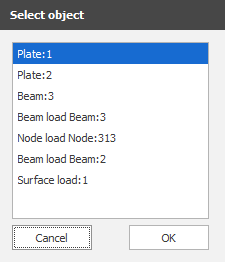
Hold down the left mouse button for a moment and a dialog box will appear with a list of all overlapping objects sorted by depth. You can then select one or even several objects here. Use the Shift key or the Ctrl key, respectively, to make the desired selection.