Joints
Joints can be entered at nodes.
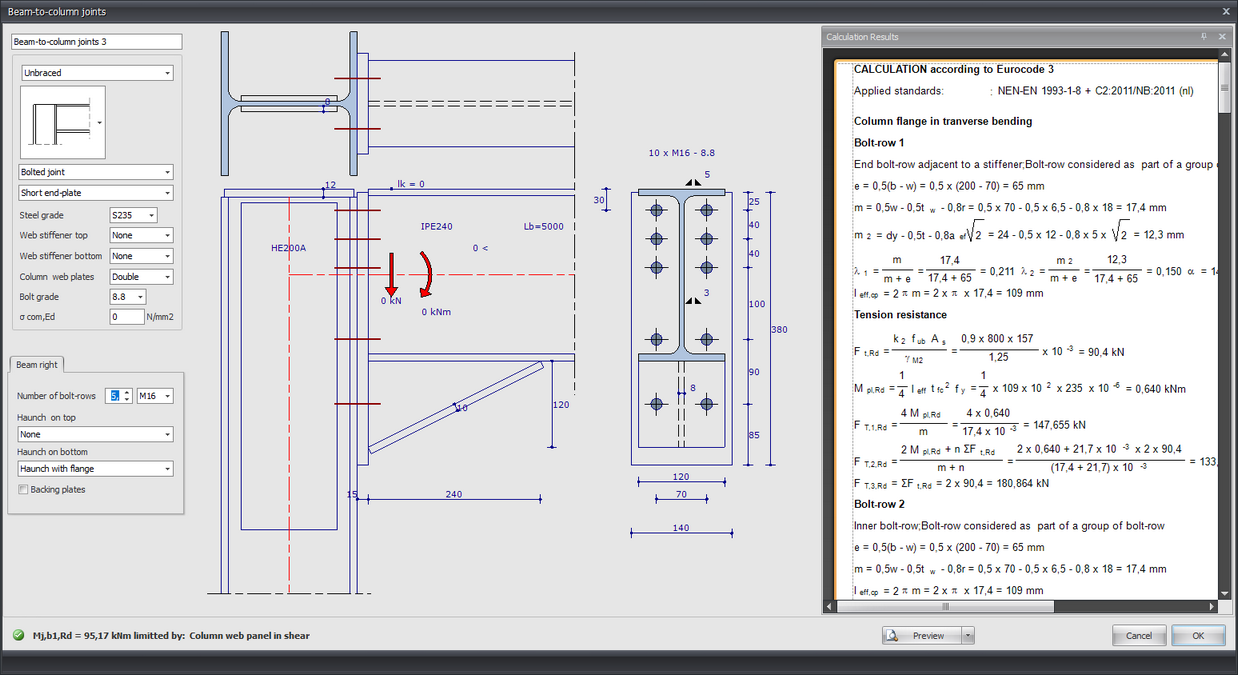
Input in Drawing
In the drawing of the connection you can change almost everything. You can change all sizes by clicking on the number in the dimension line.
You can also change the profiles, beam angles and loads in the drawing. This not only works quickly, but is also intuitive. You will experience how easy and how pleasant it is to work with XFEM4U. The calculation results can be displayed on the right as "docked" or as a separate screen on a second monitor. With every change that is made, the calculation is carried out and the results are immediately visible. In that way you can quickly see the effect of your change. You can see everything in one overview, both the input and the calculation output.
Connection Parameters
Lb=4000
Length of the beam (This value can be changed in the drawing.)
The length is only important for the classification of the rotational rigidity of the connection. (rigid / semi-rigid / hinged)
0 <
Angle of the beam.
Dialog Box Settings
You set a number of parameters in the dialog box below.
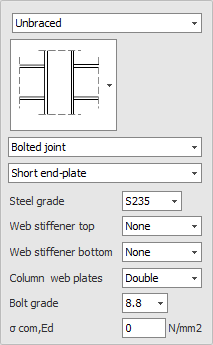
Classification Construction
Braced / Unbraced
This is only important for the classification of the rotational rigidity of the connection. (rigid / semi-rigid / hinged)
Type Connection
Bolted joint / Welded joint
Type End Plate
Short end-plate / Extended end-plate
Steel Grade
Select the steel grade for the connection.
Web Stiffener Top
None / Full / Partial
Web Stiffener Bottom
None / Full / Partial
Column Web Plates
None / Single / Double
Bolt Grade
Select the bolt grade for the connection.
Sigma;com,Ed
The largest axial compression stress in the column. This is calculated automatically and does not need to be entered.
Additional Settings
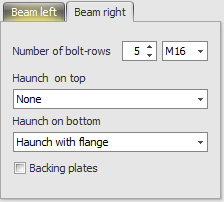
Beams Symmetrical
With a double connection (left and right) you can set whether both are equal (symmetrical) or not. This means that when you change one side, the other side changes automatically.
Number of Bolt-Rows
The number of bolt rows is at least 2.
Bolt
Bolt diameter and settings.
Haunch on Top
None / Haunch without flange / Haunch with flange
Haunch on Bottom
None / Haunch without flange / Haunch with flange
Backing Plates
Setting whether backing plates are used.