Graphical Input
Graphical view of the built up section, with:
- Cross section of all profiles used. The focused section is displayed with another color.
- Coordinate system
- Centroid
- Principal axis
- Distances from centroid to all largest dimension
- Display of radius of gyration
- Display of plastic neutral axis
Mouse Right Click Context Menu
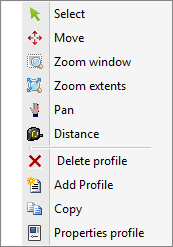
Menu

Select
You can change the focused profile by left click mouse button within the profile bounds.
Move
Profiles can be moved. There is an automatic snap to known points, which will make moving profile quite easy. You can change the coordinates as well.
Zoom Window
With this function you can zoom in on a part of your construction. You can use this by making the graphical input easier.
Zoom Extents
With zoom extents the total built up section is shown in full screen.
Pan
By the use of pan you can drag / move a zoomed part of your drawing.
Distance
In this modus distances can be measured.