Grid Lines / Levels
In XFEM4U it is possible to use a standard grid with grid lines. A standard raster is created, but you can adapt this raster.
Beams and nodes can be easily drawn into the grid. XFEM4U has a magnet function, which snaps to points into the grid.
Guide Lines
In XFEM4U it is possible to enter drawing guide lines. Guide lines can be very convenient when entering your construction. A display option has been added so you can show or hide these guide lines.
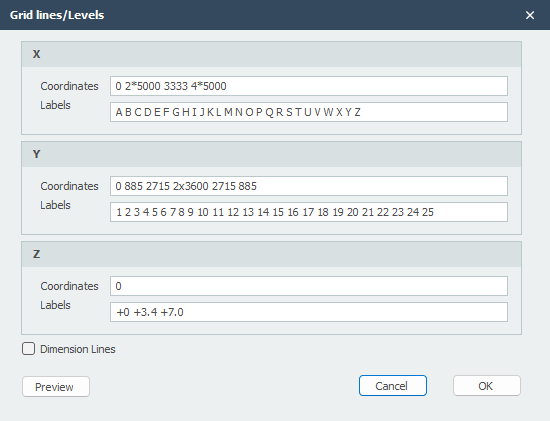
Coordinates
You can define the grid lines yourself.
Syntax: "distance spacing1 amount x spacing.. etc"
Example: "0 3000 3x2200 2800"
For the z-coordinate, if you enter the numbers with a +, then you are entering absolute values.
Labels
The indication of the grid lines.